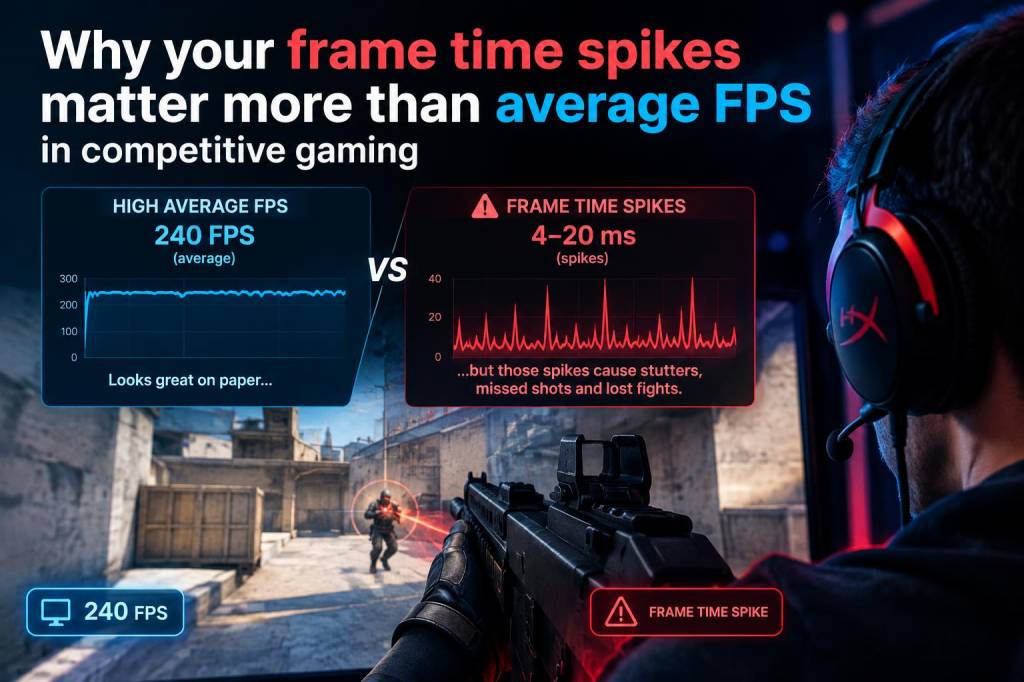
I used to chase average fps numbers like they were a scoreboard, and for a while I convinced myself that was enough. If a game said 240 fps on paper, I felt ready for ranked play. But after enough matches, enough aim duels, and enough moments where my crosshair felt oddly delayed despite a “great” fps readout, I learned something more important: frame time spikes matter more than average fps in competitive gaming.
That shift changed how I test hardware, tune settings, and judge performance. Average fps can still matter, but it can also hide problems that your hands instantly feel. A game can look excellent on a benchmark chart and still feel inconsistent in a real match. When that happens, your aim, timing, recoil control, and reaction confidence all take a hit. Competitive play is about repeatability, not just high numbers.
Why average fps can mislead your eyes and your hands
Average fps is a simple summary. It tells you roughly how many frames your system rendered over a period of time. That is useful, but it is also incomplete. If your game spends most of its time at 240 fps and then suddenly drops into a few long frames, your average may still look strong. Your experience, however, will not feel smooth.
What matters in a match is not only how many frames you get, but when each frame arrives. If the timing between frames is uneven, motion can feel uneven. Your camera movement may feel sticky, micro-adjustments may overshoot, and a duel can feel slightly “off” even when the fps counter looks fine.
That is why I care so much about frame time. Frame time is the duration each frame takes to render. Stable frame times create stable motion. Unstable frame times create inconsistency, and inconsistency is poison in competitive games.
What a frame time spike actually feels like in play
A frame time spike is not always a dramatic freeze. Sometimes it is a tiny hitch, a slight stall, or a momentary jump in motion. In a fast shooter, that can happen during a smoke bloom, an ability effect, a new enemy model entering view, or a burst of action on screen. You may not even notice the spike consciously, but your aim often reacts to it anyway.
Here is what I usually notice when frame time spikes are present:
- Mouse movement feels less predictable during fast flicks.
- Tracking enemies feels uneven, especially at close range.
- Spray control becomes harder because visual feedback is inconsistent.
- Peek timing feels slightly late, even if reaction speed has not changed.
- Micro-stutter creates extra mental load, which makes me play more cautiously.
That last point matters more than many players realize. Once your brain senses instability, confidence drops. You start second-guessing clean swings, and that hesitation costs more fights than a small average fps difference ever could.
Why competitive games punish inconsistency more than casual games
In single-player play, a brief hitch can be annoying but manageable. In ranked play, every tiny inconsistency is multiplied by pressure and speed. Competitive games reward players who build habits around rhythm and trust. If your display, GPU, CPU, and game engine all cooperate consistently, you can focus on decisions instead of performance anxiety.
I have seen this especially in tactical shooters like Counter-Strike 2, VALORANT, and Rainbow Six Siege. These games reward exact timing, clear target acquisition, and controlled movement. A frame time spike during a swing or while holding an angle can break that rhythm. Even if your monitor refresh rate is high, a bad frame delivery pattern can still make motion feel messy.
That is also why players with very different rigs can report very different experiences at similar average fps. One system may hold 300 fps with tightly clustered frame times, while another swings between 220 and 360 with occasional spikes. On paper, both look strong. In play, one feels stable and the other feels twitchy.
How I compare frame time stability against fps averages
When I test a setup, I do not stop at the average fps line in a benchmark overlay. I look at frame pacing, lows, and consistency under real match conditions. A system that looks impressive in a short benchmark may still stumble when the game gets busy.
I pay attention to a few practical signs:
- Does the camera feel smooth during fast pans?
- Do ability effects, explosions, or utility usage create visible hitches?
- Does aim feel different in fights with many characters on screen?
- Do recorded clips show motion jumps that I did not notice live?
- Does performance stay consistent after a long session, not only at launch?
If I answer yes to any of those, I start looking for frame time spikes rather than chasing a higher average number. Sometimes the fix is as simple as changing a graphics option. Sometimes it means checking CPU load, background apps, shader compilation, drivers, or memory behavior.
Why a high average fps can still feel worse
This sounds strange until you experience it yourself. A game running at 200 fps with clean frame pacing can feel better than a game running at 260 fps with uneven delivery. The higher average is not automatically better if it comes with instability.
There are several common causes:
- CPU bottlenecks during intense scenes or crowded fights.
- Shader compilation or asset streaming stutters.
- Background tasks stealing resources at the wrong moment.
- Driver issues or game updates changing performance behavior.
- Unstable overclocks or memory settings that look fine until load shifts.
I have also noticed that some settings choices create a false sense of performance. For example, lowering settings can raise average fps, but if the game becomes more CPU limited, it may still show spikes when action gets heavy. In that case, raw fps rises while actual match comfort barely improves.
What I change first when I want smoother competitive play
My first goal is not maximum fps. My first goal is stable frame delivery. I would rather lock in a slightly lower number that stays smooth than chase a peak number that swings all over the place.
These are the changes I usually test first:
| Area | What I check | Why it matters |
|---|---|---|
| Graphics settings | Shadows, effects, crowd detail, post-processing | These often trigger spikes during busy scenes |
| Frame cap | Cap below monitor refresh or use a stable target | Can reduce pacing swings and input inconsistency |
| Drivers | Latest stable version, not always newest beta | Driver changes can affect frametime behavior |
| Background apps | Browsers, launchers, overlays, recording tools | Extra software can create sudden interruptions |
| Memory and CPU | XMP/EXPO stability, thermals, boost behavior | Weak CPU or unstable memory often causes spikes |
I also like to test with recording turned on and off. Sometimes a setup feels clean until capture software adds a layer of pressure. If you stream or clip often, that load matters in real play, not only in a synthetic benchmark.
Why input feel is tied to frame pacing
Players often talk about “input lag” as if it only comes from a mouse or monitor setting, but frame time stability is part of that feeling too. If frames arrive unevenly, your actions can seem delayed or less crisp. You click, move, or strafe at the right moment, but visual feedback lands in a way that feels late or rough.
That is one reason I prefer a stable system over a flashy one. If my setup gives me predictable motion, my muscle memory stays intact. I can trust what I see on screen. That trust is worth a lot in a clutch round.
It also explains why two players on identical refresh rates can have very different experiences. A 240 Hz monitor does not automatically deliver a clean competitive feel if the frame times feeding it are erratic. Smoothness is a chain, and every link has to cooperate.
What I watch during benchmark runs and real matches
When I evaluate performance, I separate synthetic numbers from actual play. Synthetic tests can be useful, but they do not always capture the chaos of a live match. In a real game, I watch for sudden frame time jumps during:
- Large team fights or utility-heavy moments.
- Map transitions and new area loading.
- Ultimate abilities, particle effects, or destruction events.
- Long sessions where heat buildup may reduce boost behavior.
- Repeated alt-tabbing or overlay activity.
I also try to replay the same scenario more than once. If a spike happens only once, I want to know whether it was random or repeatable. Repeatable spikes usually point to a setting, driver, or workload issue. Random spikes can still be a problem, but they often require deeper investigation.
What players should remember before upgrading hardware
Many players assume they need a stronger GPU when performance feels bad. Sometimes that is true. But in competitive gaming, a GPU upgrade is not always the first fix. If your frame time spikes come from CPU limits, memory instability, thermal throttling, or bad background load, a faster graphics card may not solve the real issue.
Before buying new parts, I like to ask a few questions:
- Is performance inconsistent across many games, or only one?
- Do spikes happen during combat, loading, or after long sessions?
- Is the CPU already near its limit while the GPU is not fully used?
- Are temperatures or power limits changing behavior over time?
- Did a recent driver, patch, or setting change alter smoothness?
Those questions usually tell me more than a single fps average ever could. Competitive gaming rewards systems that stay calm under pressure, just like players do.